Our LLM coding setup at Paper Run
At Paper Run, we’ve been spending some time figuring out a good process for everybody on the team to work with LLMs and AI coding effectively.
We work very closely with our customers, partly because a lot of our time goes into building internal tools for our sales and growth teams. Paper Run is part software company, part service company. It’s one of these new service-as-software startups, and by building internal tooling for our growth and sales teams, we make the service side of the business much faster. By building software for our customers, we improve how they use and read the data we provide them, as well as building out new features for our products.
All of this to say: by using LLMs more effectively, and making it simpler to trigger them with sufficient context, we can increase velocity while building the right thing. That context usually comes at least in part from our internal stakeholders.
The tools
We use:
- Linear, for anyone to create tickets. Engineers get assigned or self-assign tickets.
- Multica, to trigger and manage agentic coding tasks. Uses its own tickets (usually one-to-one with Linear tickets, but sometimes we’ll split tickets here for smaller PRs).
linear2multica, a cli to transfer tickets and give them assignees and labels in Multica.
Multica has a couple of features we find very useful. It integrates with Claude Code, Codex, and Opencode. We use a mixture of models depending on the complexity of the task. It also has a concept of squads, where a group of agents collaborate with each other.
So in Multica, we create tickets that come from a Linear ticket. The Linear ticket gets a label, and that label dictates which agent or squad in Multica gets assigned the ticket. Engineers assign the label in Linear manually, so when the work…
- Will be fairly complex -> use a frontier coding model squad (at the moment, Fable 5 + GPT-5.6 Sol).
- Needs some upfront planning but seems simple -> mid-size models (at the moment, Opus 5 + GPT-5.6 Luna).
- Is purely exploratory, and we don’t want a PR at the end of it -> Fable 5 with an appropriate prompt.
- Is very straightforward or can be completed by an agent skill that we’ve built -> a smaller model like GPT-5.6 Luna in fast mode.
The flow
Either an engineer or an internal stakeholder creates a Linear ticket. If it was an internal stakeholder, the engineers assigned to it go in and add the technical context to the ticket.
Then we add a label to the Linear ticket. That triggers an n8n workflow, which looks at the ticket’s status and labels and decides whether it can be sent over to Multica via a webhook.
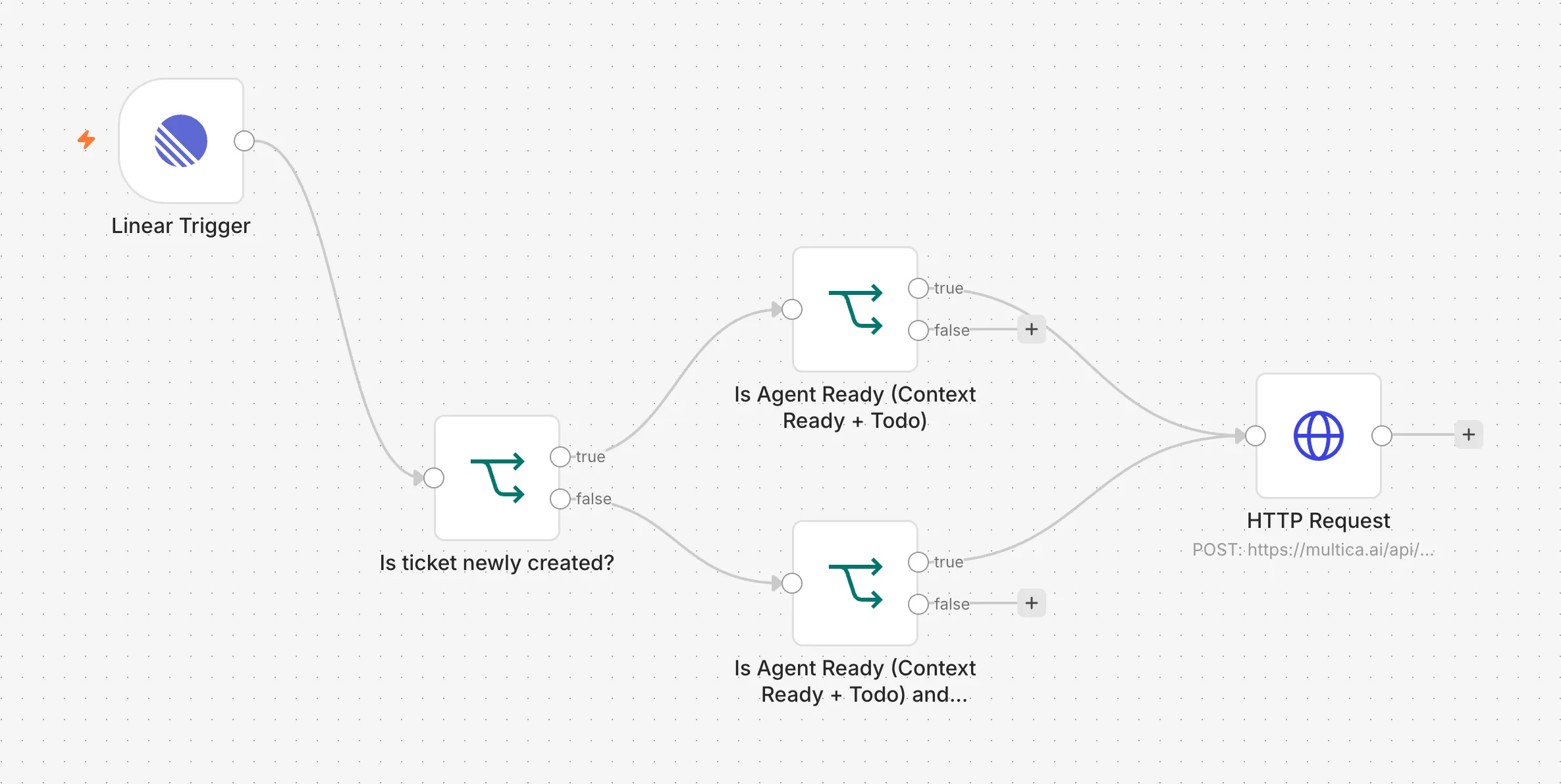
In Multica, an agent automation kicks off. Based on the webhook data it decides who the Multica agent assignee should be and what label to add to the issue (engineers use their to see what work they own at a glance). It then uses an internal tool we call linear-to-multica, which gets called with the Linear ticket ID, the desired assignee, and the label. Using this tool means the agent doesn’t have to mess about with linear API or multica CLI.
The outcome of each Multica ticket is either a pull request, or a plan or exploration finding in the Multica ticket itself.
Pull requests go through Greptile for review, and a separate Multica automation looks at the Greptile comments and resolves them, making changes as needed. In any case, all outputs require engineering supervision: either we review the pull request, or we look at the findings and decide what to do with them.
Reviewing the work
When it comes to reviewing pull requests, we found that Multica doesn’t create git worktrees. That sounds like a limitation, until you get to the point of running the code to make sure it does what it’s supposed to: good UX, no visual problems, nothing overcooked.
If Multica created worktrees, we’d have to go into the worktree, copy in our .env file so we can run the stack locally, start the stack, and stop any other worktree stacks that are running so we don’t get port conflicts. All of this can be solved with more tooling, of course. But that’s more tooling we’d have to build and use.
Since Multica uses separate sandboxed folders instead and the agents make a pull request whenever there are code changes, this simplifies our workflow. When an agent is done, we can go into our code editor and check out their branch. That reloads our running backend and web app automatically, and we can go in and check the changes without stopping and restarting the entire stack or moving .env files around.
So at the end of the flow, all the engineer has to do is check out the branch in their editor, open the website, and make sure things are working. Or they can open an API testing tool like Bruno and make requests there.
Of course, in this era of fast changes in AI, all of this is developing very rapidly, and there are many sharp edges.
For example, all pull requests are currently made under one specific engineer’s GitHub account. So it looks like they’re being very productive, when really the code changes are handled, steered, and owned by other engineers. Same thing with API keys on the machine running the agents: they’re under one specific user. We’re solving this as we go, with service accounts and GitHub apps. Simply, at this stage, the observability hasn’t taken priority over velocity. A bigger company would want to handle all of this.
Non-context-ready tickets
This post can’t end without saying that there’s always work that simply can’t be offloaded to a largely non-interactive environment like Multica.
Sometimes you just have to go into the code and make sure you understand it well before you start work. Tickets you have to explore together with the agent. You let it ask you questions, you backtrack, and you try different approaches. Tickets where you have to look at the UI before you can even begin to think about what you want to achieve. And in many other cases, you have to talk to your users to figure out how they use the product and how you might build something that helps them. Remember that sometimes users will ask you for stuff that isn’t actually what helps them. Part of our job as engineers is still to figure that out.
So there are tasks we call context ready. These are the tasks we’ve learned we can offload to these agent groups quite effectively. And there are often many tasks that aren’t context ready. Until they are, they can’t be offloaded. Sometimes it’s just easier to develop them together with the agents, or even manually. And sometimes you learn there was no need for them at all.
Thank you for reading!